MCP with Postgres - Querying my data in plain English
When coding, most of us have become comfortable using LLMs with our codebases to write features, fix bugs, understand logic flows, and examine code architecture. This has improved both our efficiency and the quality of our work.
I have found that LLMs can offer similar benefits when working with data. For about a year, I have been using them to query data in situations such as these:
● Explore data without writing SQL
Example: How many users who registered in the past month used feature X, and how frequently did they use it?
● Make product decisions using code and data
Example: Is our fund classification clean enough to introduce a “Years Beating Category” metric on fund category pages? If not, what part of our code logic causes the misclassification?
● Diagnose data-dependent bugs
Example: User X encountered “Unknown error. Please try later.” when trying to add ETF 541 to their portfolio. I can’t reproduce it with the test user. Check both users' settings and the relevant code for possible causes.
This post explains how I set up Codex and Cursor to query my PostgreSQL data in plain English.
Here’s a screencast recording that covers it all:
I first prepare safe database access, connect the coding agent to PostgreSQL, and give it enough schema and application context to meaningfully interact with the database. I then show how I query the data in plain English. I also detail where this approach has and hasn’t worked for me. The code snippets used in the video are included along the way.
The examples in this post use PostgreSQL with Cursor and Codex. The same approach also works well with other relational databases and AI IDEs including Claude Code.
1. Prepare safe database access
You’ll need the following details to connect the coding agent to your database:
- Host and port
- Database name
- Username and password
The following is an example of restricting a PostgreSQL user to read-only access:
-- Example permissions for database, schema, tables, and sequences
REVOKE CREATE, TEMPORARY
ON DATABASE portfolio_manager
FROM mcp_db_user;

REVOKE CREATE
ON SCHEMA public
FROM mcp_db_user;

REVOKE ALL PRIVILEGES
ON ALL TABLES IN SCHEMA public
FROM mcp_db_user;

GRANT SELECT
ON ALL TABLES IN SCHEMA public
TO mcp_db_user;

REVOKE ALL PRIVILEGES
ON ALL SEQUENCES IN SCHEMA public
FROM mcp_db_user;

GRANT SELECT
ON ALL SEQUENCES IN SCHEMA public
TO mcp_db_user;
Note: The exact query statements for your setup may vary depending on your database structure.
2. Connect the coding agent to PostgreSQL
An MCP server provides the coding agent with an interface for interacting with the database. I have used two MCP servers in the past:
- @modelcontextprotocol/server-postgres - a deprecated but deliberately read-only PostgreSQL MCP server.
- Google’s @toolbox-sdk/server - an actively maintained server with additional capabilities, such as custom tools.
Although @toolbox-sdk/server is more flexible, I generally use @modelcontextprotocol/server-postgres because its read-only interface suits my needs.
For Cursor, enable Privacy Mode under Cursor Settings:

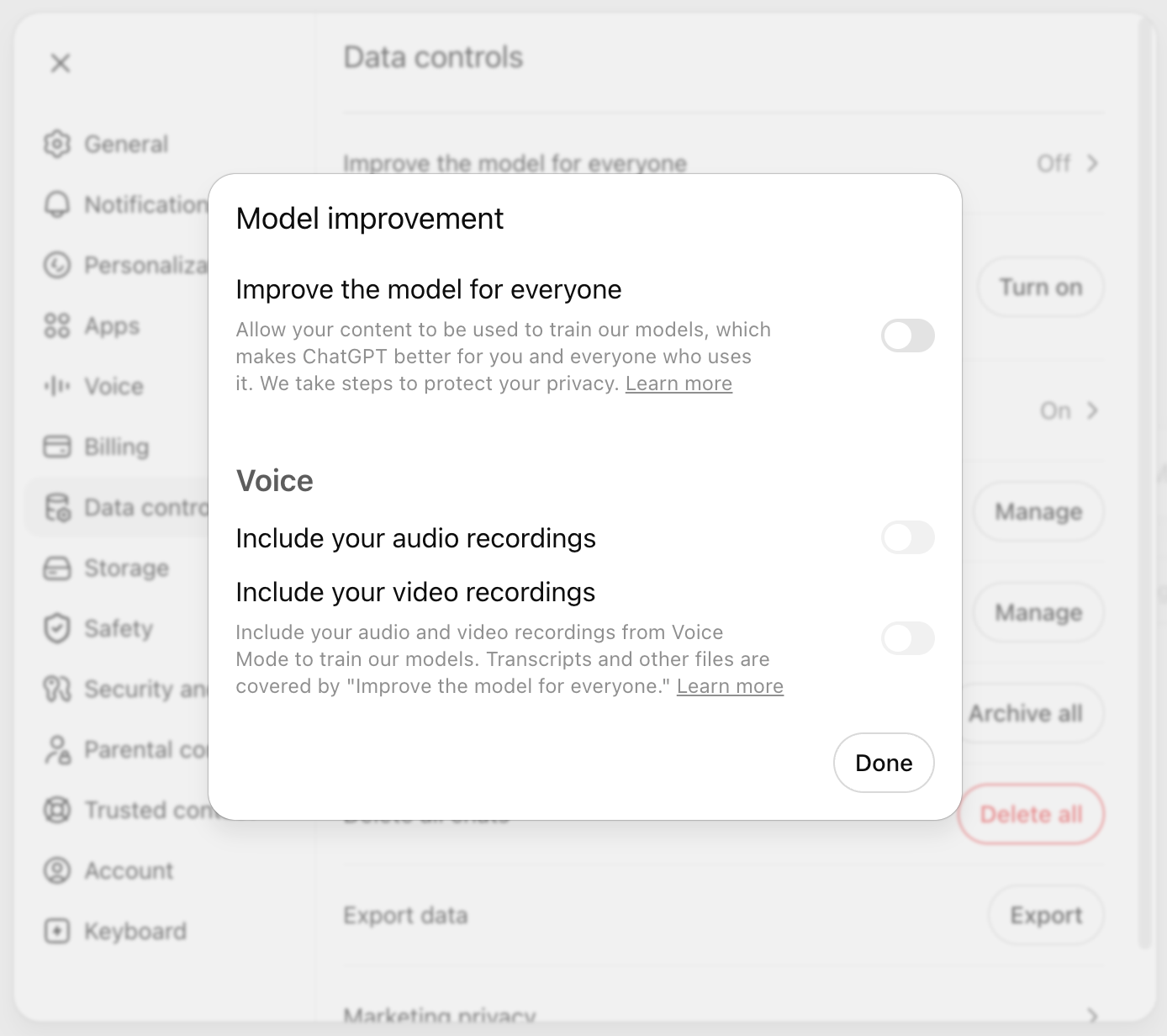
For Codex, review the Data Controls available on chatgpt.com:
Prompting the coding agent to add the MCP server
I tested the following prompt with both Codex (5.5 Medium) and Cursor (Auto), and it worked well for quickly adding the MCP server to a project:
The following are my PostgreSQL database connection details. Can you add @modelcontextprotocol/server-postgres as an MCP server for this database in my current project?

Host=<host>
Port=<port>
Database=<database_name>
User=<read_only_user_name>
Password=<read_only_user_password>
If you want more control over your MCP configuration (e.g., database credentials in a separate file), you can add the MCP server manually.
Manually adding the MCP server to Cursor
To add the MCP server manually, update <project-folder>/.cursor/mcp.json with the following JSON, replacing the connection-string placeholders with your database details:
{
  "mcpServers": {
    "postgres_mcp_server": {
      "type": "stdio",
      "command": "npx",
      "args": [
        "-y",
        "@modelcontextprotocol/server-postgres",
        "postgresql://<read_only_user_name>:<read_only_user_password>@<host>:<port>/<database_name>"
      ]
    }
  }
}
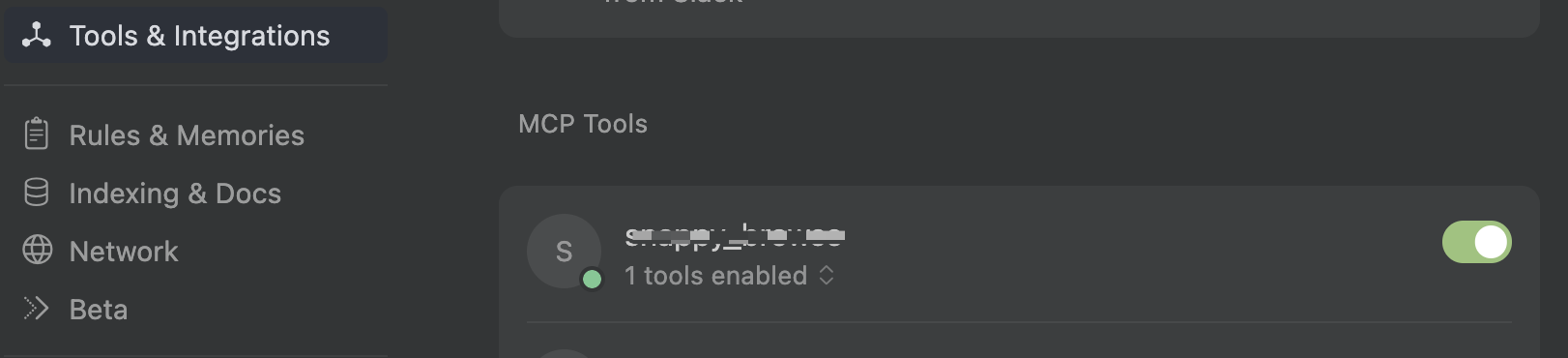
After restarting Cursor if necessary, the MCP server should appear in its settings as shown below:
Manually adding the MCP server to Codex
In Codex, project-specific MCP settings go in <project-folder>/.codex/config.toml and look like the following:
[mcp_servers.postgres_mcp_server]
command = "/bin/bash"
args = [
  "-c",
  'source "$HOME/.nvm/nvm.sh" && nvm use >/dev/null && exec npx -y @modelcontextprotocol/server-postgres "postgresql://${POSTGRES_USER}:${POSTGRES_PASSWORD}@${POSTGRES_HOST}:${POSTGRES_PORT}/${POSTGRES_DATABASE}"'
]
cwd = "<project-folder>"
enabled = true
required = false
startup_timeout_sec = 30
tool_timeout_sec = 60
default_tools_approval_mode = "prompt"

[mcp_servers.postgres_mcp_server.env]
POSTGRES_HOST = "<host>"
POSTGRES_PORT = "<port>"
POSTGRES_DATABASE = "<database_name>"
POSTGRES_USER = "<read_only_user_name>"
POSTGRES_PASSWORD = "<read_only_user_password>"
After adding the configuration, restart Codex and enter /mcp to view the available MCP servers. Alternatively, ask the agent: Can you list all the MCP servers available for this project?
Keeping credentials outside the MCP configuration file
If the MCP configuration file needs to be committed to Git, keep the database credentials in an .env file and include the specific file in .gitignore.
- For Cursor, use
envFileto specify the file containing the credentials (for example,"envFile": "${workspaceFolder}/.cursor/env/postgres.env"). - For Codex, store the credentials in a file such as
<project-folder>/.codex/mcp.envand source that file when starting the MCP server (for example,set -a; source <project-folder>/.codex/mcp.env; set +a).
Alternative: using psql instead of an MCP server
If setting up an MCP server feels unnecessary and psql is available in the coding agent’s environment, you can ask the agent to use it directly:
Use psql to connect to the database with the following read-only credentials when needed. For now, confirm that you can connect and run a harmless query.

Host: "<host>"
Port: "<port>"
Database name: "<database_name>"
Username: "<read_only_user_name>"
Password: "<read_only_user_password>"
To make psql available to a reusable agent (e.g., an agent that helps identify the root causes of bugs), you can add these instructions to a skill while keeping the credentials in an ignored .env file. Because this approach bypasses the MCP server’s read-only protections, it is especially important to use a database user whose permissions are restricted at the database level.
3. Give the coding agent context about the database
Connecting the coding agent to the database allows it to run queries, but it still needs context to generate useful ones. If you already have a thorough and up-to-date database design document, you can provide that document directly.
If that documentation is unavailable, incomplete or out of date, the following prompts can help create Markdown files describing both the physical database structure and how the application uses it.
Generate the physical schema
The physical schema tells the coding agent about tables, columns, indexes, constraints, and other database objects. To generate it, I asked the agent to write a shell script using the following prompt:
Write a shell script that:
    - accepts my database host, port, database name, username, password, an output file path as named flags
    - reads the database schema
    - writes the physical schema information described below to the output file in Markdown format

For every table, the script should list:
    - Table name
    - All columns and their types
    - Foreign keys, primary keys, unique and check constraints, defaults nullability, and related indexes

The script should also list sequences, functions, and procedures.

You can inspect my database schema through the MCP server to help write the script. Ask me how to handle any additional types of objects you discover.
The prompt generated a shell script that I could run as follows:
server/scripts/export-database-schema-markdown.sh \
  --host <host> \
  --port <port> \
  --database <database_name> \
  --username <read_only_user_name> \
  --password '<read_only_user_password>' \
  --output ./physical-schema.md
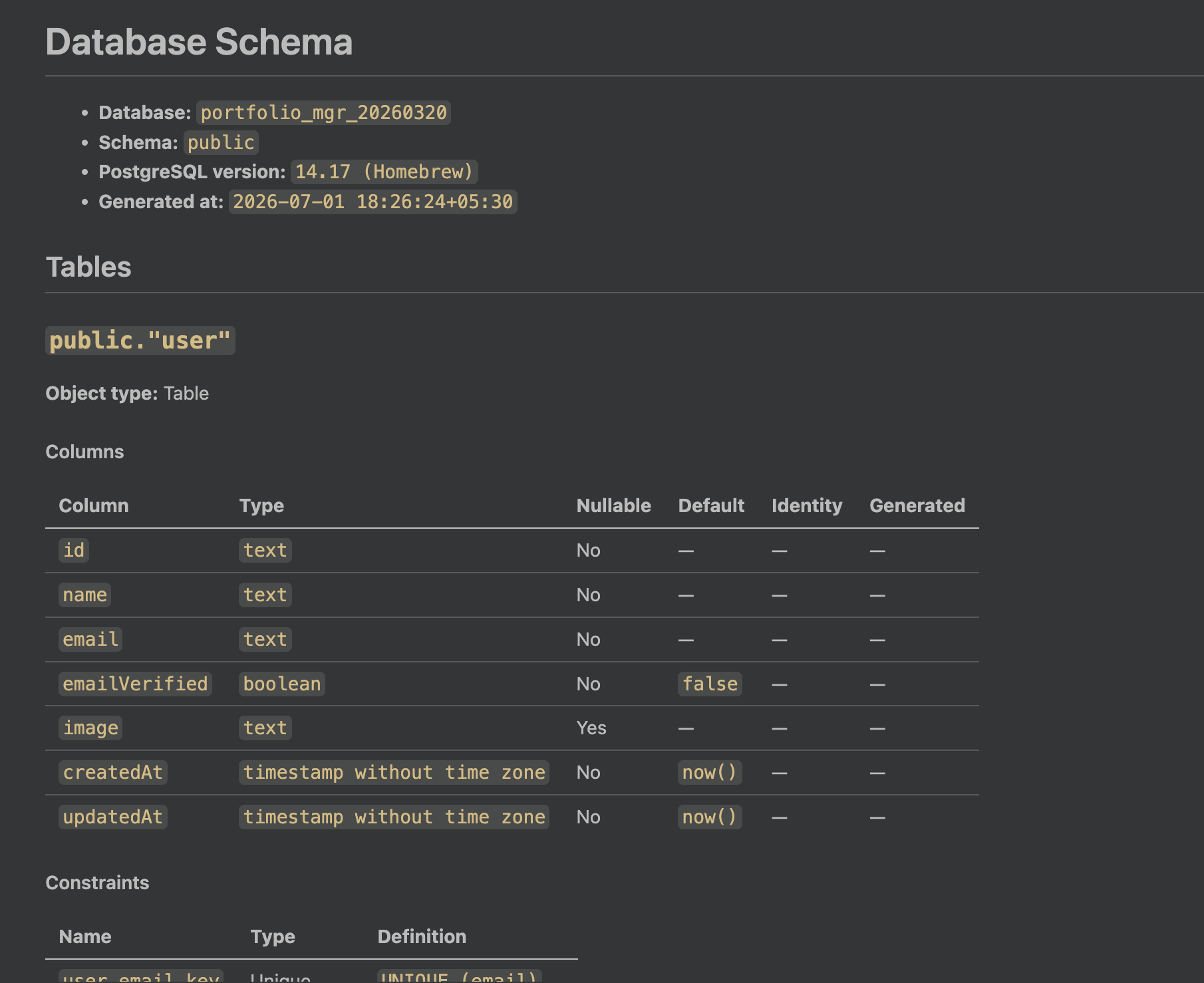
Running the script produced a physical schema document (physical-schema.md) with content like the following:
Generate the design and business context
The physical schema describes how the database is structured, but it does not explain how the application uses its tables and columns. I generated this additional design and business context from the server-side code, with two caveats:
- You need access to the server-side code that interacts with the database. If you do not have that access, you can skip this step. However, providing this context noticeably improves the agent’s output.
- Replace the code paths in the following prompt with the relevant locations in your project.
I need you to read the code in the following locations:
    - server/scripts/jobs
    - server/scripts/seeding
    - server/src/jobs/processors
    - server/src/routes

I then need you to read my physical schema at physical-schema.md.

I need you to generate design-schema.md with the following information:

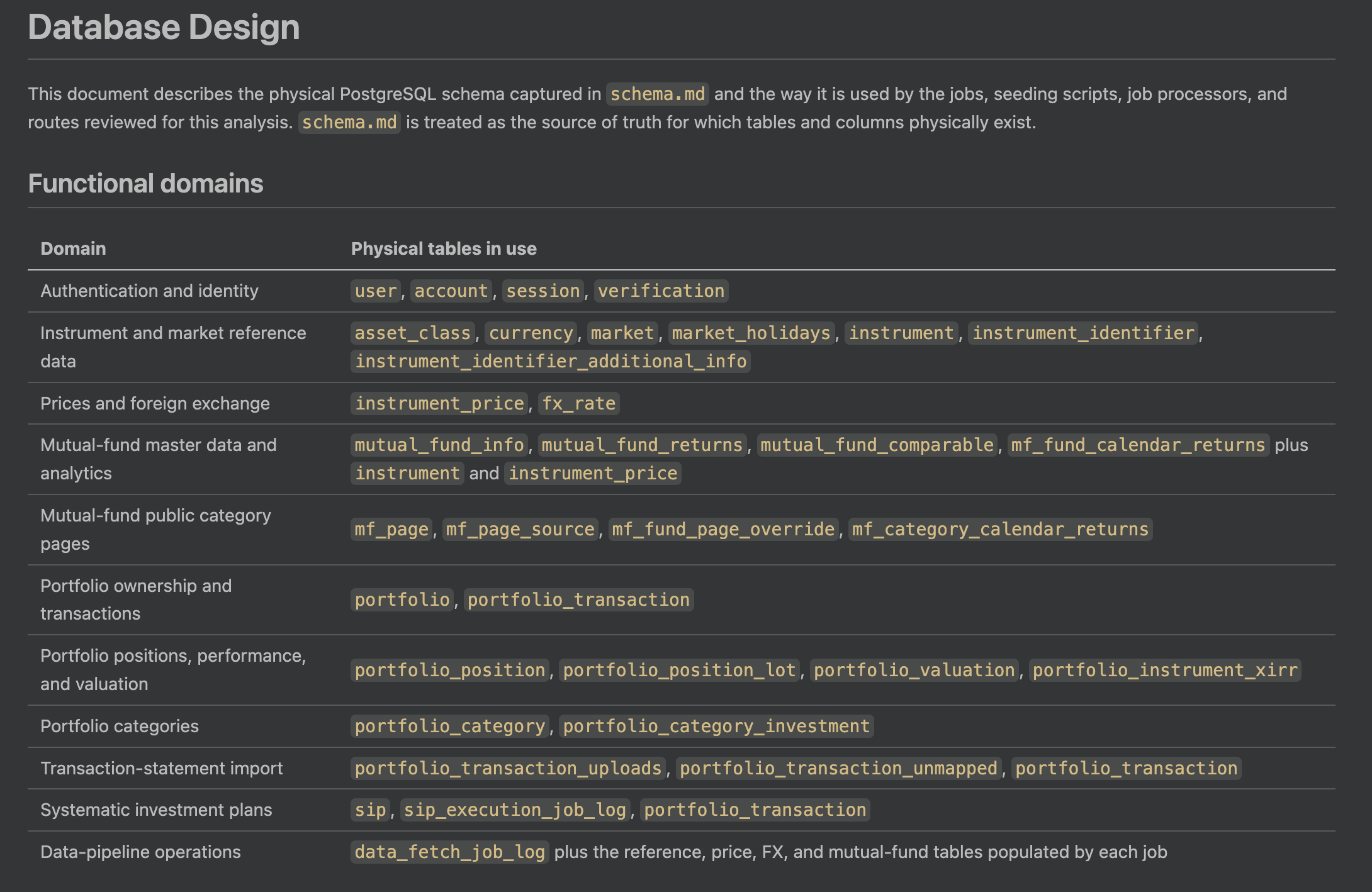
- Identify the various domains of functionality (e.g., authentication, mutual fund information, and portfolio management) and, for each domain, list the tables in use.
- Create a high-level ER diagram showing important relationships between tables. Avoid minor details.
- List every table and, for each one:
    - Describe its business purpose in a single sentence.
    - Explain the meaning and units of non-obvious columns.
    - Mention important business rules associated with important columns.
- Do not document tables or columns that you cannot decipher. Avoid guessing at all costs.
This prompt produced a design-context document called design-schema.md with content like the following:
Provide example queries
One of the most effective ways I found to improve the agent’s output was to provide representative example queries. This works well for two reasons:
- The collection can grow over time as I add useful, verified queries.
- In the absence of detailed design context, good examples can still help the agent produce reasonable queries.
-- Query to get portfolio with non-zero positions along with user email to
-- which the portfolio belongs
SELECT DISTINCT
    p.id,
    p.name,
    p.base_currency,
    u.email
FROM portfolio p
JOIN "user" u
  ON u.id = p.user_id
JOIN portfolio_position pp
  ON pp.portfolio_id = p.id
WHERE pp.quantity <> 0
ORDER BY u.email, p.name;


-- Query to fetch instances with mutual fund NAV entries on market holidays
SELECT
    i.id AS instrument_id,
    i.name AS fund_name,
    i.isin,
    ip.as_of_date,
    ip.price AS nav,
    ip.currency,
    ip.source,
    mh.occasion
FROM instrument_price ip
JOIN mutual_fund_info mfi
  ON mfi.instrument_id = ip.instrument_id
JOIN instrument i
  ON i.id = ip.instrument_id
JOIN market_holidays mh
  ON mh.holiday_date = ip.as_of_date
ORDER BY ip.as_of_date DESC, i.name;

-- Query to get count of funds in each fund category along with their asset class
WITH page_funds AS (
    SELECT
        mps.page_id,
        mfi.instrument_id
    FROM mutual_fund_info mfi
    JOIN instrument i
      ON i.id = mfi.instrument_id
    JOIN mf_page_source mps
      ON mps.gr_category = mfi.category
     AND mps.gr_sub_category = mfi.sub_category
    WHERE mfi.gr_slug IS NOT NULL
      AND mfi.plan_type = 'Direct'
      AND mfi.option_type = 'Growth'
      AND i.is_active = TRUE
      AND mfi.exclude_from_mf_public_pages IS NOT TRUE
      AND NOT EXISTS (
          SELECT 1
          FROM mf_fund_page_override fo
          WHERE fo.instrument_id = mfi.instrument_id
      )

    UNION ALL

    SELECT
        fo.page_id,
        fo.instrument_id
    FROM mf_fund_page_override fo
    JOIN mutual_fund_info mfi
      ON mfi.instrument_id = fo.instrument_id
    JOIN instrument i
      ON i.id = fo.instrument_id
    WHERE mfi.gr_slug IS NOT NULL
      AND i.is_active = TRUE
      AND mfi.exclude_from_mf_public_pages IS NOT TRUE
)
SELECT
    mp.id,
    mp.asset_class,
    mp.display_name,
    COUNT(DISTINCT pf.instrument_id) AS fund_count
FROM mf_page mp
LEFT JOIN page_funds pf
  ON pf.page_id = mp.id
WHERE mp.is_active = TRUE
GROUP BY mp.id, mp.asset_class, mp.display_name
ORDER BY mp.asset_class, mp.display_name;
The examples above are only a small sample. Generally, the more relevant and representative examples I provide, the better the agent’s output. My example-queries.sql typically contains about 25–30 examples of queries I use frequently.
4. Put it all together: query the data in plain English
Once the connection and context are in place, querying the database becomes the short part of the process.
My prompt for an exploratory query:
Using @design-schema.md and @physical-schema.md and @example-queries.sql give me the count of funds listed for each mutual fund page. I want to make sure there aren't any pages with fewer than 5 funds. Use the postgres MCP server as needed.
AI agent’s response with the needed data:
My prompt to investigate a bug with code and database in context:
For Gold funds (displayed on the page "/mutual-funds/commodities/gold") the category average of 76% for the year 2025 appears unreasonable. Can you check the code and underlying data to identify the issue? Use @design-schema.md and @physical-schema.md and @example-queries.sql and Postgres MCP server to analyze the data?
How it identified the bug in my setup:
When the agent generates a useful query, I also ask it to share the query so I can add it. Over time, this gives the agent better examples for translating plain-English requests into SQL.
5. When this setup worked well for me and when it didn’t
This setup worked particularly well for exploratory analysis and agentic tasks needing quick data insights (e.g., diagnosing bugs using both code and data). I found the quality of its output to be closely related to the quality and relevance of the queries in example-queries.sql.
I found the setup less useful when working on tasks like optimizing queries or when needing to use specific SQL features (e.g., recursive CTEs). These queries were also harder to verify so I was uncomfortable relying on a one-shot result. In those situations, I used the setup to generate an initial query and then refined it manually as well as with focussed input from the LLM.

Got a web-dev pain point?
I'm an independent web dev & architect.
What I do:
- Architecture - Guidance on frameworks, tools, system design, cloud infra
- Fullstack Dev - Frontend, backend, CMS customization, migration, upgrade
- Optimization - Core web vitals, scalability, SEO compliance
Tech I use:
Node.js, React, Next.js, Postgres, Strapi, Directus, MySQL, AWS, GCP, Serverless (Lambda, CF Workers), ElasticSearch, Redis, RabbitMQ, Kibana
My Clients Include:



Or email: punit@tezify.com

I'm an independent web dev & architect.
What I do:
- Architecture - Guidance on frameworks, tools, system design, cloud infra
- Fullstack Dev - Frontend, backend, CMS customization, migration, upgrade
- Optimization - Core web vitals, scalability, SEO compliance
Tech I use:
Node.js, React, Next.js, Postgres, Strapi, Directus, MySQL, AWS, GCP, Serverless (Lambda, CF Workers), ElasticSearch, Redis, RabbitMQ, Kibana
My Clients include:
Or email : punit@tezify.com
