 Hire Me
‘use client’ in Next.js: What It Does, What It Costs, and When to Use It

Specifying the use client directive for a Nextjs component makes it a Client Component. But that doesn’t mean the component only renders on the client-side. It is still rendered on the server.
So what does the directive use client actually do?
The use client directive tells Nextjs that this component must also run in browser - enabling things like React hooks (useState, useEffect) and event handlers (onClick).
Below is a quick summary of what use client changes:
Server?
to browser?
on client?
hooks?
But what does it mean for a component to ship JavaScript to the browser or to hydrate on the client? And what do you pay for enabling this interactivity? Let’s delve into the details.
For highly interactive apps (like dashboards), using
use client more broadly is often appropriate, but is beyond the scope of this post.
1. Example code repositories for this post
To understand the impact of the use client directive, we’ll compare two nearly identical Next.js applications.
Both applications:
- Fetch and render the same list of products
- Have the same UI
The difference between the two is that one is purely server-rendered with no browser-side interactivity. The other enables browser-side interactivity using
use clientcomponents.
1.1. Server Component version
- Repo : no-use-client
- Live demo : View page
- Key file : app/page.tsx
This version uses the default Server Component throughout and does not include any browser-side interactivity.
1.2. Client Component version (with ‘use client’)
- Repo : with-use-client
- Live demo : View page
- Key files : app/page.tsx and ClientPage.tsx.
This version renders the same UI, but enables interactivity by using use client in the top-level component and several child components.
The rest of the post uses to these two implementations to observe the differences.
2. What ‘use client’ actually does
Adding a use client directive to a component doesn’t switch off server-side rendering for the component. As you can see below, both versions still return fully rendered HTML from the server.
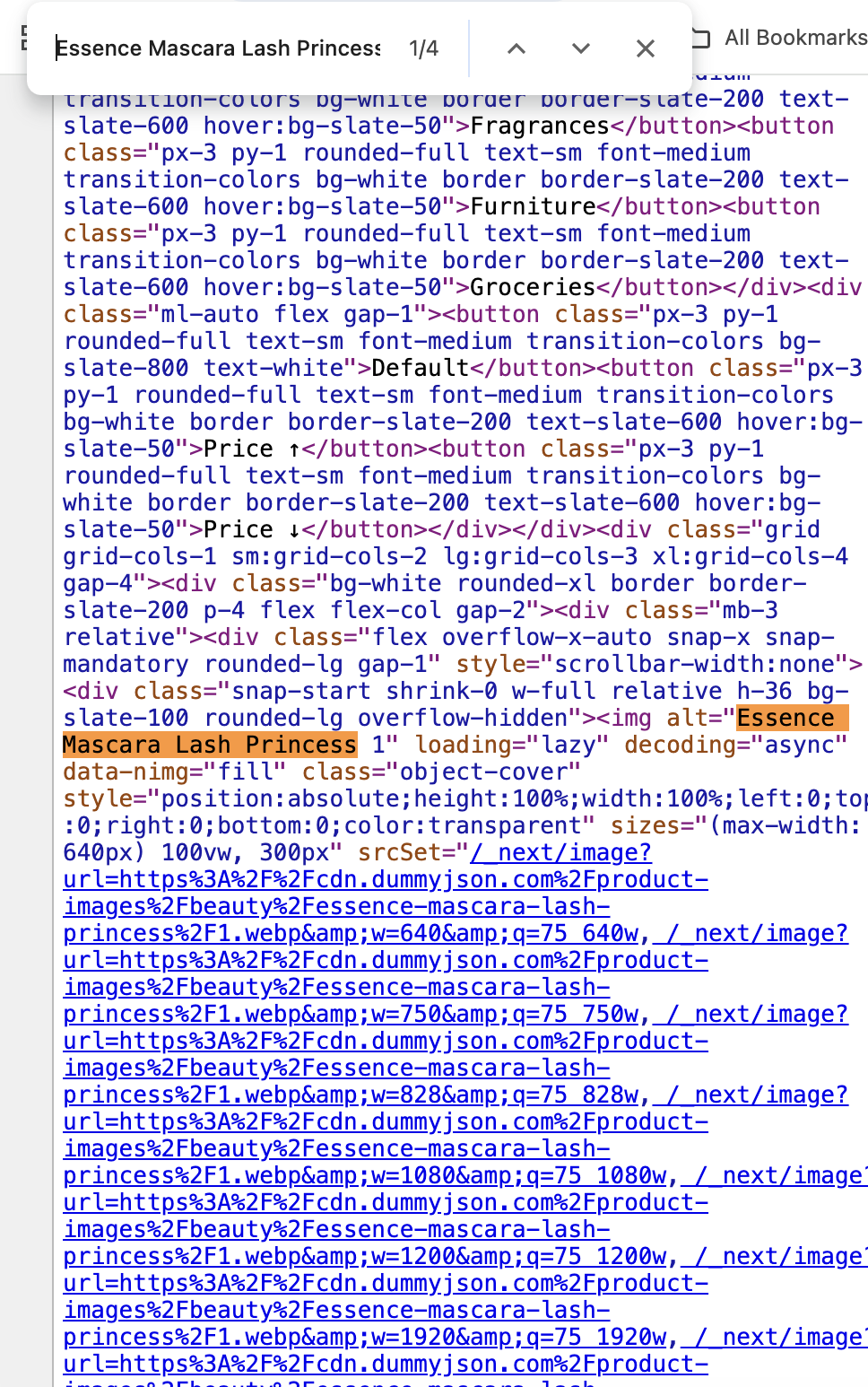
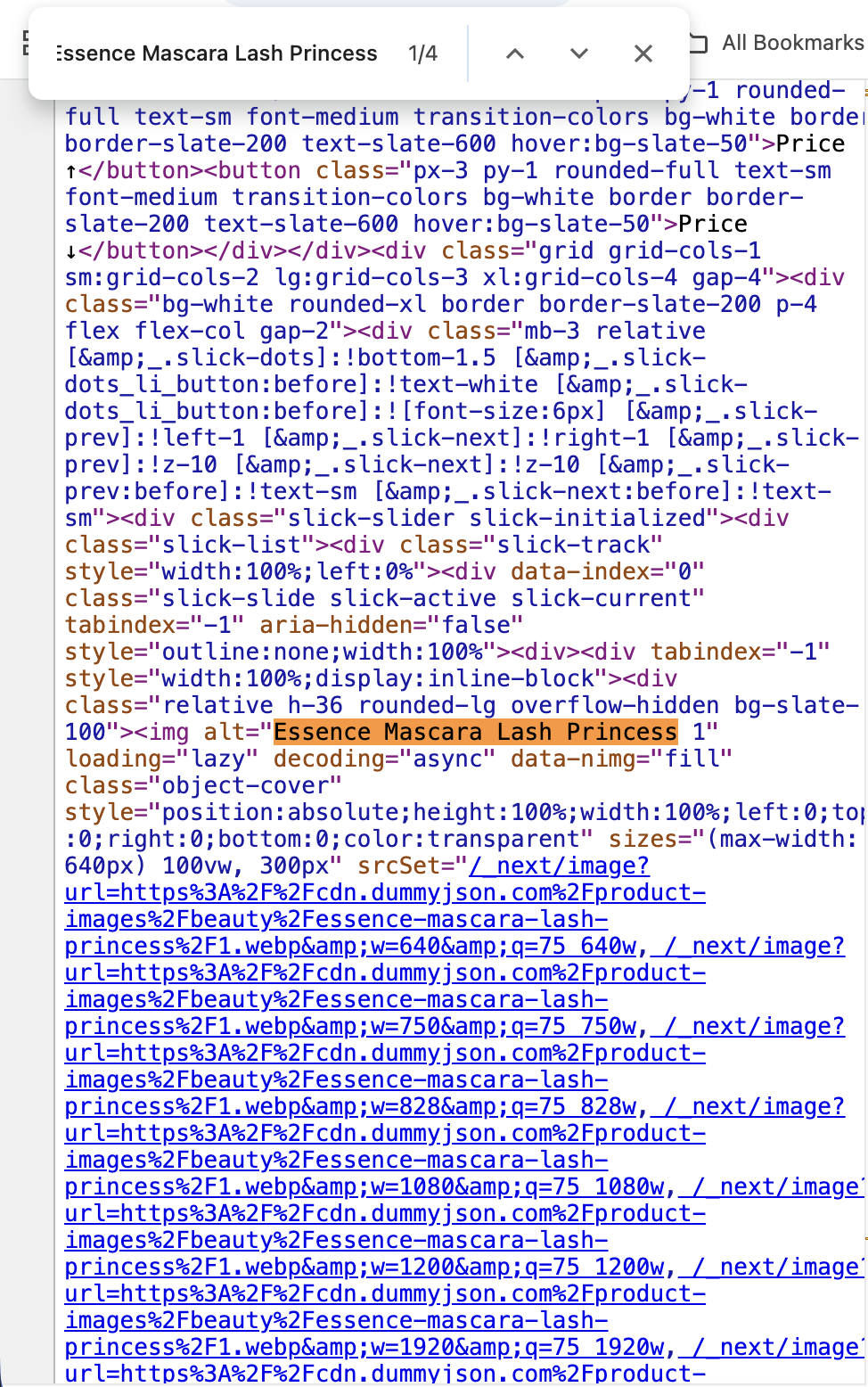
Both versions return fully rendered HTML from the server, even when use client is used.
The presence of use client tells Next.js to:
- send the JavaScript for that component and other components that also use
use clientto the browser. - when the page loads in the browser, React hydrates these components so they become interactive.
Learn more about React hydration here
2.1 How ‘use client’ enables browser-side interactivity
We need use client to specify to Nextjs that the component requires browser-side interactivity. A couple of trivial examples:
- A hamburger menu that expands when clicked (uses
onClick). - An email input field changes the border to red if the entered email address is in an invalid format (uses
onChange+useState).
To implement such interactivity, we rely on React hooks (like useState) and event handlers (like onClick). These only work in Client Components.
Even simple interactions like handling a button click require use client, even if no hooks are used.
'use client';

import { useState } from 'react';

export default function EmailInput() {

  // useState enables interactivity,
  // which requires `use client`
  const [email, setEmail] = useState('');
  const isValid = /^[^\s@]+@[^\s@]+\.[^\s@]+$/.test(email);

  return (
    // onChange work only in Client Components
    <input
      type="email"
      value={email}
      onChange={(e) => setEmail(e.target.value)}
      style={{ borderColor: email && !isValid ? 'red' : '' }}
    />
  );
}
Using hooks without use client will cause Nextjs to throw an error:
> Build error occurred
Error: Turbopack build failed with 1 errors:
./components/AddToCartButton.tsx:1:10
You're importing a module that depends on `useState` into a React Server Component module.
This API is only available in Client Components.
To fix, mark the file (or its parent) with the `"use client"` directive.
Learn more: https://nextjs.org/docs/app/api-reference/directives/use-client

> 1 | import { useState } from 'react'
    |          ^^^^^^^^
  2 |
  3 | export default function AddToCartButton({ productId }: { productId: number }) {
  4 |   const [added, setAdded] = useState(false)
Client Components render HTML and run JavaScript in the browser.
3. The costs of ‘use client’ directive
When we specify use client for a component, it has the following implications:
3.1. Bundle size
Server Components do not send their JavaScript to the browser, while Client Components do (to enable interactivity). As a result, Client Components increase the amount of JavaScript shipped to the browser.
For our example demo app, following is the size of JavaScript loading in the browser:
This is not a like-for-like comparison, since https://no-use-client.vercel.app has no interactivity while https://with-use-client.vercel.app allows filtering and sorting of products. The comparison is meant to highlight the JavaScript cost of interactivity.
3.2. Hydration cost
When a Client Component’s JavaScript reaches the browser, React needs to hydrate it to make the component interactive.
Hydration runs on the browser’s main thread and competes with other work (like handling user input and rendering). The more client-side JavaScript you have, the more work React has to do during hydration.
This can delay interactivity and contribute to sluggish responsiveness (for example, affecting metrics like INP).
3.3. Data fetching waterfall
When a component with a use client directive needs to fetch data, it cannot fetch data like this:
'use client'

export default function HomePage() {
  // Fetching like this isn't allowed in Client Components
  // since they cannot be async functions
  const products = await fetchProducts()

  return (
    <>
    /* JSX to render products */
    </>
  );
}
Instead, data fetching inside Client Components requires using hooks like useEffect:
'use client'
import { useState, useEffect } from 'react';

export default function HomePage() {
  // Fetching on-load for client components requires
  // using hooks like the following.
  const [products, setProducts] = useState([]);
  useEffect(() => {
    fetchProducts()
    .then((data) => {
      setProducts(data)
    })
  }, []);

  return (
    <>
    /* JSX to render products */
    </>
  );
}
With this pattern, when a page loads:
- The HTML is rendered first (without the data)
- JavaScript is downloaded and hydrated
- Only then data fetching begins in the browser
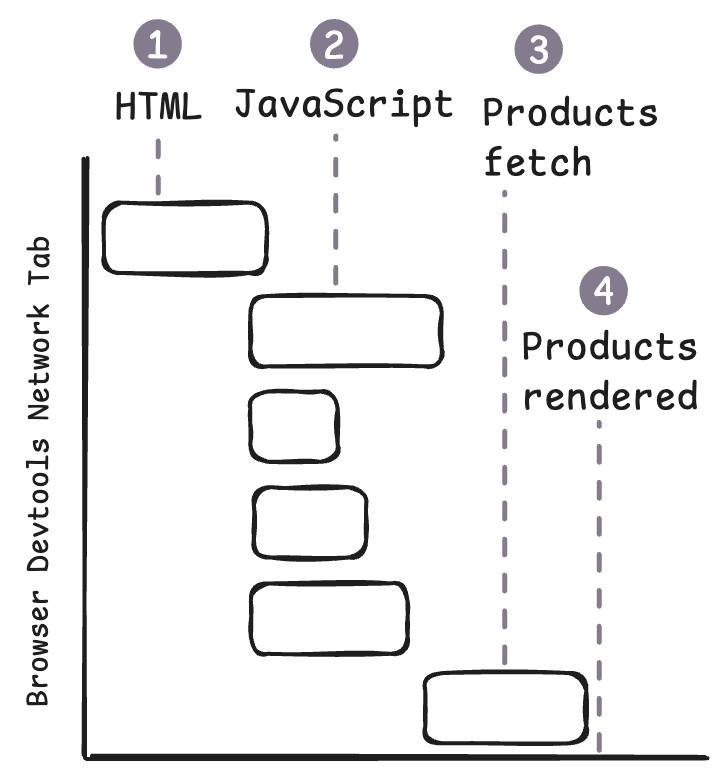
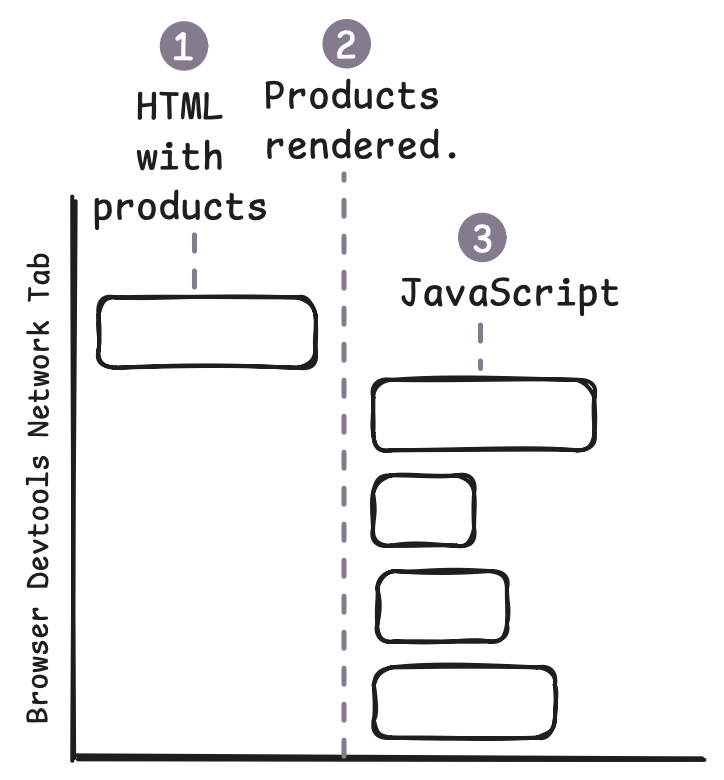
Data fetching in Client Components typically happens after hydration. This:
- delays display of the content during page loading
- results in the initial HTML not containing the page content
Also, streaming in React happens only when a Server Component suspends during render. Moving data fetching to useEffect removes these suspension points and eliminates progressive streaming. The result is an initial HTML shell that is populated only after hydration.
More JavaScript → more hydration work → enabling client-side data fetching patterns after hydration.
As a result of the above costs, use client should always be used deliberately and not by default.
4. SEO Impact
Using the use client directive by itself does not inherently harm SEO, since the initial HTML still contains the page content.
But, if a Client Component fetches data on the client (for example, inside useEffect), the initial HTML may not include that content. In such cases, search engines need to rely on JavaScript execution to see the content. This is slower and less reliable and can have a negative SEO impact.
5. The right pattern for ‘use client’
For performance and SEO sensitive pages, use client should be used within components needing interactivity. And, ideally these should be leaf components. This keeps most of the component tree as Server Components, reducing JavaScript sent to the browser and minimizing hydration work. Using it at the top-level should generally be avoided.
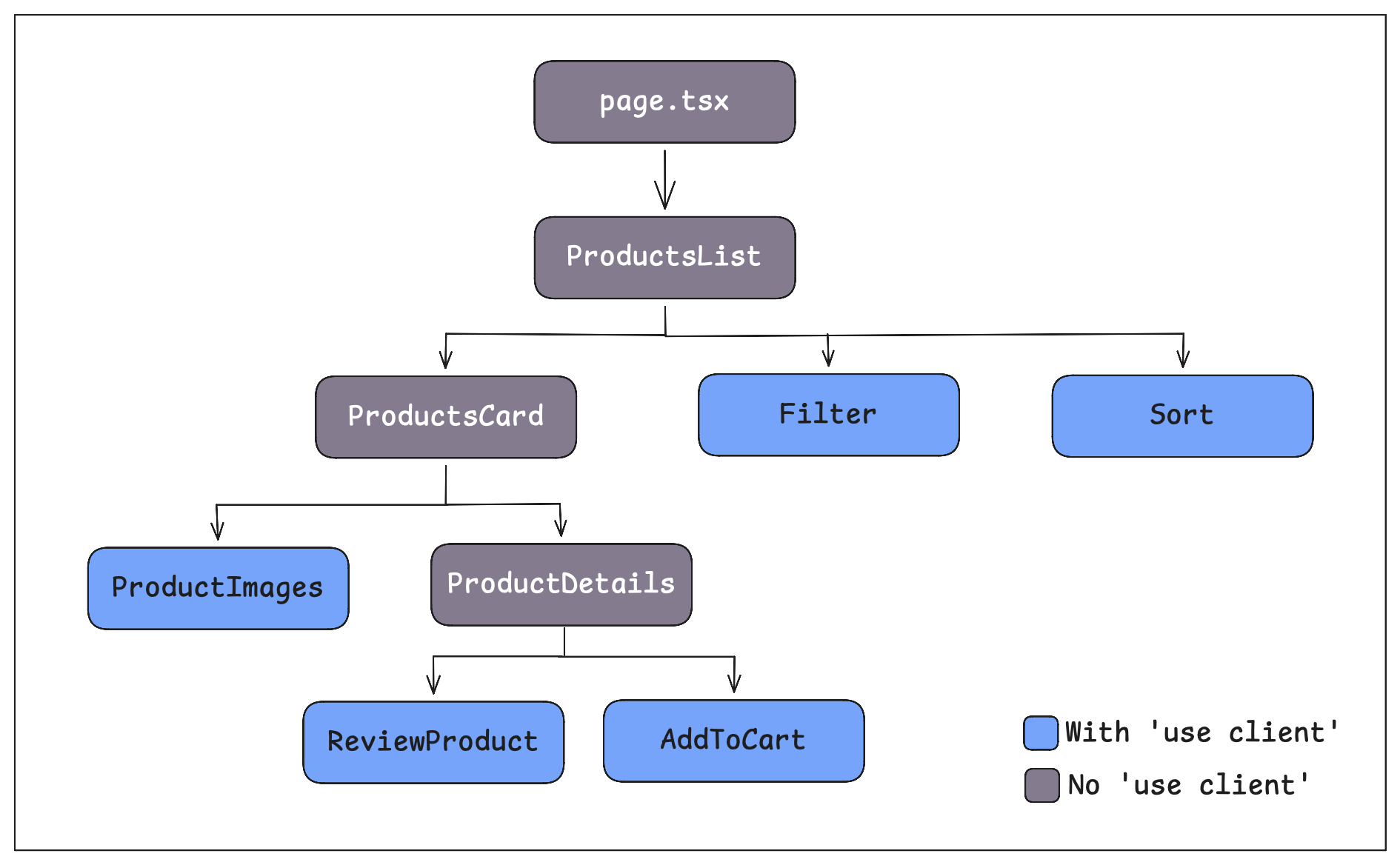
use client within leaf componentsAlso, a server component can be passed as children or as a prop to a client component and React does not convert it into a Client Component. See the code example below:
//////// page.tsx
import ProductCard from '@/components/ProductCard'
import FilterBar from '@/components/FilterBar'

export default async function HomePage() {
  const products = await fetchProducts()

  /* Homepage is a server component that passes another
  Server Component ProductCard to FilterBar as a prop */
  return (
    <FilterBar products={products} CardComponent={ProductCard} />
  );
}


//////// FilterBar.tsx
// Is a client component to enable filtering
// of products via useState
'use client'
import { useState } from 'react'

export default function FilterBar({ products, CardComponent }: Props) {
  const [category, setCategory] = useState('all')
  const filtered = products
    .filter((p) => category === 'all' || p.category === category)
  return (
    <>{filtered.map((product) => (
      <CardComponent key={product.id} product={product} />
    ))
    }</>
  )
}


//////// ProductCard.tsx
// Is not a client component even though rendered through
// FilterBar because it is passed from a Server Component
export default function ProductCard({ product }: { product: Product }) {
  return (
    /* Code to display product card */
  )
}
Also, note that Client Components cannot import Server Components directly.
6. When to use and avoid ‘use client’
Based on the trade-offs discussed above, the following guideline can help decide when to use the use client directive:
use client when:useState, useEffect, useRef, useContext)onClick, onChange, onSubmit)window, navigator, localStorage)use client when:Prefer Server Components by default, and use use client only where needed because the cost of interactivity shows up in larger bundles, hydration work and slower content loading.

Want a fast frontend that scales?
I've built and improved B2C frontends serving 2M+ monthly users to:
- Optimize Core Web Vitals
- Solve scalability issues
- Implement SEO compliance
- Select the right framework, library and hosting platform
- Incrementally migrate or upgrade frontend frameworks
B2C clients Include:



Or email: punit@tezify.com

- Solve scalability issues
- Optimize Core Web Vitals
- Implement SEO compliance
- Select the right framework, library and hosting platform
- Incrementally migrate or upgrade frontend frameworks
