 Hire Me
Vercel vs Netlify vs Cloudflare: Serverless Cold Starts Compared
- 1. Why cold start delays need to be measured
- 2. How I measured the cold-start delays
- 2.1. The Nextjs project that was benchmarked
- 2.2. Cold start detection mechanism
- 2.3. The script to measure cold start delays
- 2.4. Running the benchmarks
- 3. Results from my cold-start benchmarks
- 3.1 What percent of requests cold-started?
- 3.2. How fast were the pages served?
- 3.3. How fast were the APIs served?
- 3.4 How fast did warm runtimes serve the requests?
- 3.5 How slow did the cold started runtime serve the requests?
- 4. How to measure cold start impact on your site
- 5. Conclusion
Every time I analyze the loading speed of a website hosted on a serverless platform, one question comes up immediately:
“What percent of my site’s loading time is caused by serverless cold starts?”
This matters because:
- Other than by changing the hosting provider, there is no reliable way to permanently eliminate cold start delays.
- Due to many interacting factors, accurately measuring cold start impact for high-traffic sites can get complicated.
So, to answer this question, I created a small Nextjs project and hosted it across multiple serverless platforms and measured cold start delays. I also hosted the same project on an always-on self-hosted server to establish a baseline.
If all you need is a TL;DR summary of my benchmarking exercise:
1. Why cold start delays need to be measured
A cold start occurs when a serverless platform has to start the runtime (Node, Bun, etc) to serve a request. An always-running server already has the runtime active and simply waits for the traffic. Serverless saves cost, but runtime startup can slow the first response.
Cold-start latency is largely owing to the hosting platform and cannot be eliminated without changing hosting provider.
Whether a request is served by a warm runtime or triggers a cold start depends on multiple factors outside application control. As a result, the real-world impact of cold starts cannot be reliably inferred on high-traffic websites and requires measuring platform behavior directly.
2. How I measured the cold-start delays
Before looking at the benchmark results, it is important to understand how the benchmarks were run.
2.1. The Nextjs project that was benchmarked
I created this Next.js project and deployed it on Vercel, Cloudflare and Netlify. I also self-hosted it on a DigitalOcean droplet (Node v22, NY data center, 1GB memory, 1vCPU) to get a stability baseline for comparison.
Key characteristics of the benchmarked project:
- Built using Next.js v16 App router serving pages as React Server Component (RSC).
- All pages forced to be dynamic via
export const dynamic = 'force-dynamic'. - Data-fetching done via a
fakeFetchwhich loads static JSON bundled with the project. - Two API routes:
/api/compute-likesimulating negligible compute./api/db-likesimulating light data processing without external I/O.
- Built-in cold-start detection mechanism (detailed below in #2.2)
- For pages - exposed in the page footer (see screenshot below)
- For APIs - returned as part of the JSON response
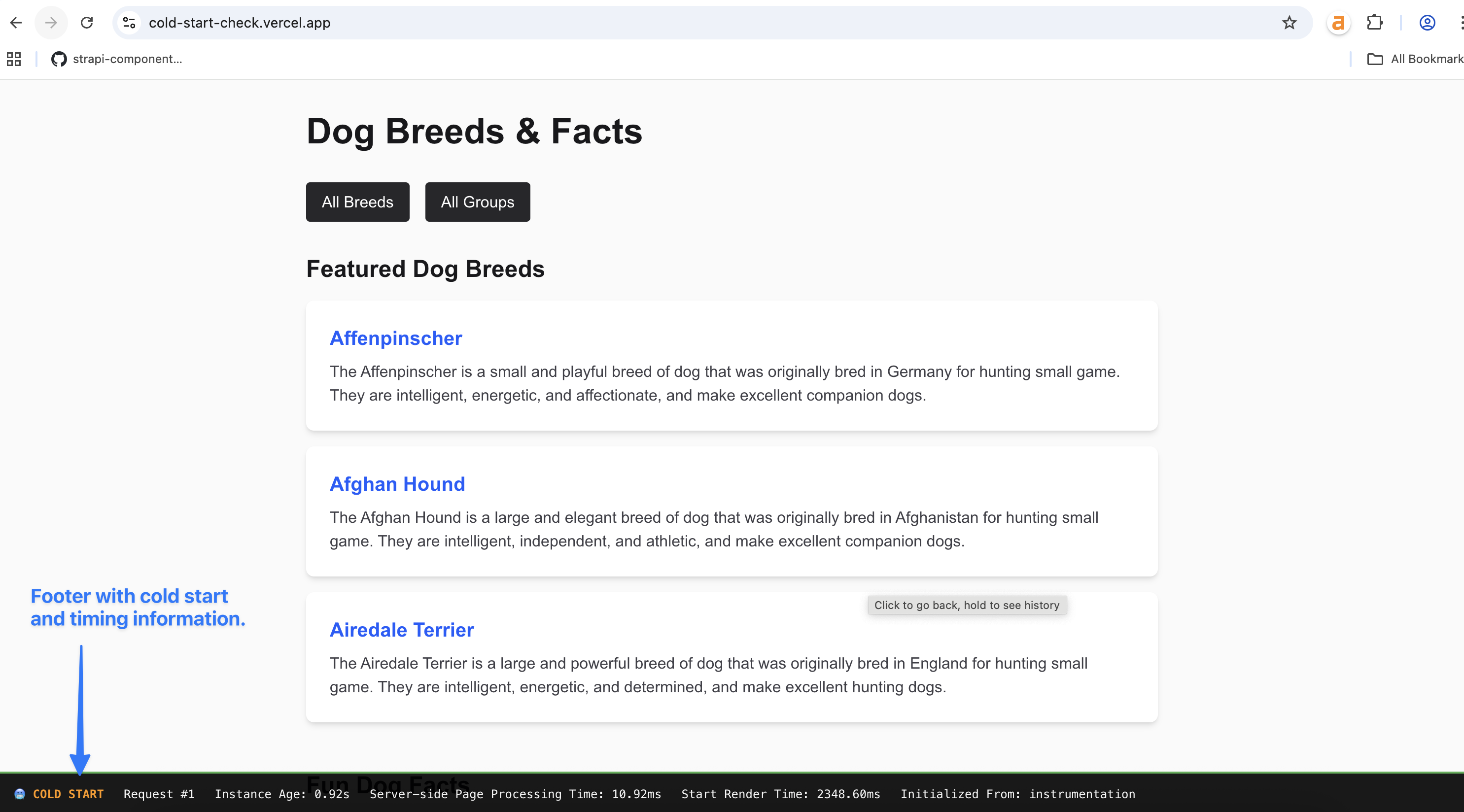
2.2. Cold start detection mechanism
To identify if a request was served by a warm instance or a cold started one, the instrumentation.ts (see the file here) contains the below code that is executes once at runtime startup:
// instrumentation.ts - executes once at the start of the runtime
export function register() {
    if (process.env.NEXT_RUNTIME === 'nodejs') {
        const initTime = Date.now()

        // Mark this instance as initialized
        global.__INSTANCE_INIT_TIME = initTime
        global.__REQUEST_COUNT = 0
        global.__INITIALIZED_FROM = 'instrumentation'

    }
}
For page requests, layout.tsx (see the file here) executes on every request add derives cold start metadata from global state:
// layout.tsx - executes for every page request
function getTimingData(): TimingData {
  // Initialize if not already done
  if (typeof global.__REQUEST_COUNT === 'undefined') {
    global.__REQUEST_COUNT = 0
    global.__INSTANCE_INIT_TIME = Date.now()
    global.__INITIALIZED_FROM = 'timing'
  }

  const requestCount = ++global.__REQUEST_COUNT
  const instanceInitTime = global.__INSTANCE_INIT_TIME || Date.now()
  const isColdStart = requestCount === 1
  const instanceAge = Date.now() - instanceInitTime

  return {
    isColdStart,
    requestCount,
    instanceAge,
    instanceInitTime,
    initializedFrom: global.__INITIALIZED_FROM,
  }
}
This information is exposed to the browser via meta tags:
<script>
  const timingData = getTimingData();
</script>
<head>
  <meta name="x-request-count" content={timingData.requestCount.toString()} />
  <meta name="x-is-cold-start" content={timingData.isColdStart.toString()} />
  <meta name="x-instance-init-time" content={timingData.instanceInitTime.toString()} />
  <meta name="x-initialized-from" content={getInitializedFrom() || ''} />
</head>
For APIs, the same metadata is returned as part of the JSON response
export async function GET(request: Request) {
  // ...
  const timingData = getTimingData();

  // ...
  // ...

  const processingTime = Date.now() - start;

  return Response.json({
    data : {
      // ...
      // ...
    },
    timing : {
      "x-page-processing-time": processingTime,
      "x-request-count": timingData.requestCount,
      "x-is-cold-start": timingData.isColdStart,
      "x-instance-age": ((Date.now() - timingData.instanceInitTime)/1000).toFixed(2)+'s',
      "x-initialized-from": getInitializedFrom() || ""
    }
  });
}
Each response therefore contains the following cold-start specific information:
- Whether this was served by a cold started runtime.
- Age (in seconds) and count of requests served by the runtime.
2.3. The script to measure cold start delays
To make page and API requests and collect performance metrics, this Playwright based Node.js project is used.
Metrics collected:
- For API requests, TTFB measured via
request.timing().responseStart - request.timing().requestStart. - For page requests, DOM Interactive time measured via:
const navigation = performance.getEntriesByType('navigation')[0];
const domInteractiveTime = navigation.domInteractive - navigation.fetchStart;
DOM interactive time was preferred over TTFB for pages since some platforms (e.g. Vercel) leverage HTTP streaming while other platforms (e.g. Netlify) don’t. While streaming improves TTFB, it did not reflect when the page became usable for the pages in this benchmark. DOM interactive better represented this user-perceived readiness.
2.4. Running the benchmarks
Benchmark execution followed this pattern:
- The script sequentially fired 11 distinct URLs per platform.
- After each run, the script slept for 60 minutes to allow the runtimes to scale down.
- This cycle was repeated for 48 hours resulting in 3044 total requests.
Execution environment was as following:
- Benchmarks ran from two Hetzner VPS instances
- US east (Ashburn, VA)
- US west (Hillsboro, OR)
- Multiple locations were used to avoid giving the baseline self-hosted setup undue advantage.
Platform configuration:
- Default settings were used for Cloudflare, Vercel and Netlify (all on free plans) to enable execution from their respective edge / data center locations.
- Self-hosted instance served traffic from DigitalOcean NY data center.
Scope of the benchmark execution:
- The focus was to observe frequency and impact of cold-start under very low traffic.
- It does not attempt to model high concurrency scenarios.
3. Results from my cold-start benchmarks
Below are the results from the 48-hour benchmark, broken down by platforms, frequency of cold-starts and how expensive cold-starts are.
3.1 What percent of requests cold-started?
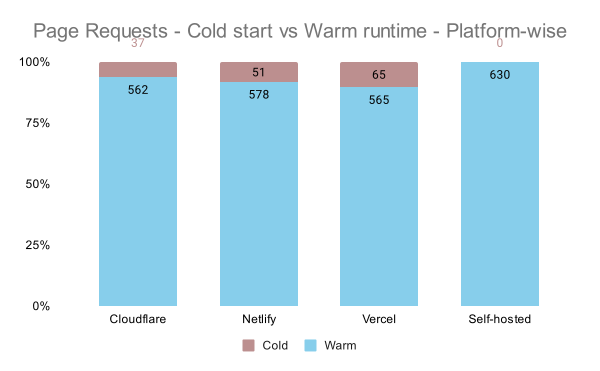
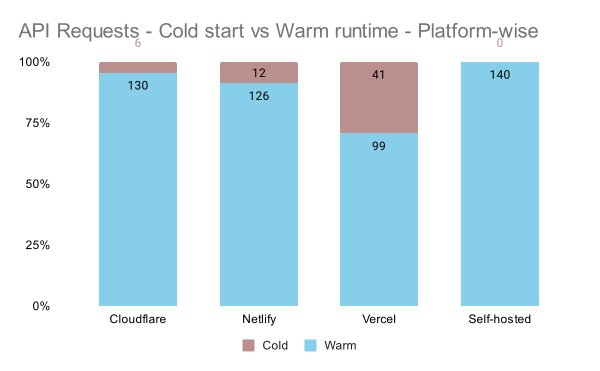
Requests to Cloudflare cold-started the least, while API requests served by Vercel cold-started unusually more frequently than those for other platforms.

3.2. How fast were the pages served?
Cloudflare delivered the fastest page responses overall while Netlify was consistently the slowest. Although Vercel performed well in-general, its tail latency was notably worse than the always-on baseline, indicating higher variability.

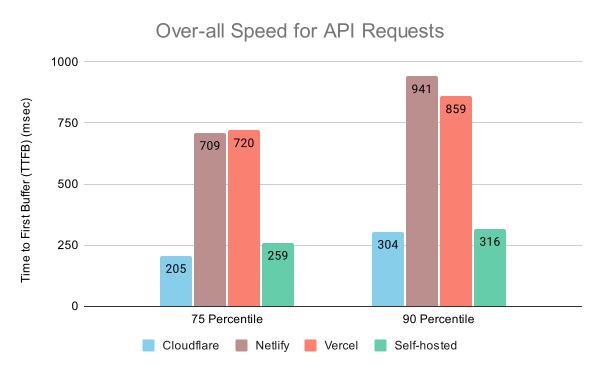
3.3. How fast were the APIs served?
Again, Cloudflare was the fastest. Both Vercel and Netlify were the slowest with similar response speed behavior. The always-on setup exhibited the least speed variation.
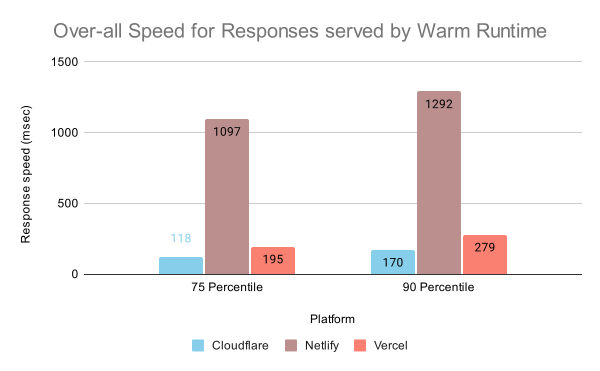
3.4 How fast did warm runtimes serve the requests?
Netlify is super-slow even when the requests are served by warm runtimes. In contrast, both Cloudflare and Vercel respond faster than always-on server when their runtime doesn’t need a cold-start.
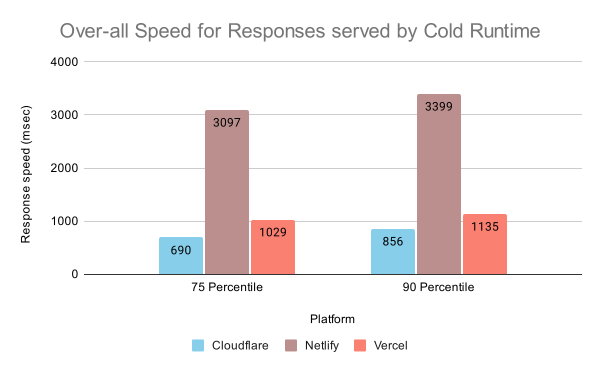
3.5 How slow did the cold started runtime serve the requests?
Netlify, which is notably slower than the other platforms takes 3+ seconds to serve response when cold-started. Vercel’s responses during cold-start also take ~1 second. In contrast, Cloudflare is the fastest to serve the response during cold-starts.
4. How to measure cold start impact on your site
Vercel provides built-in visibility into cold starts via Observability dashboard (Functions section). With its Observability Plus plan, various metrics can be grouped by Start Type, making cold-start analysis straight forward.
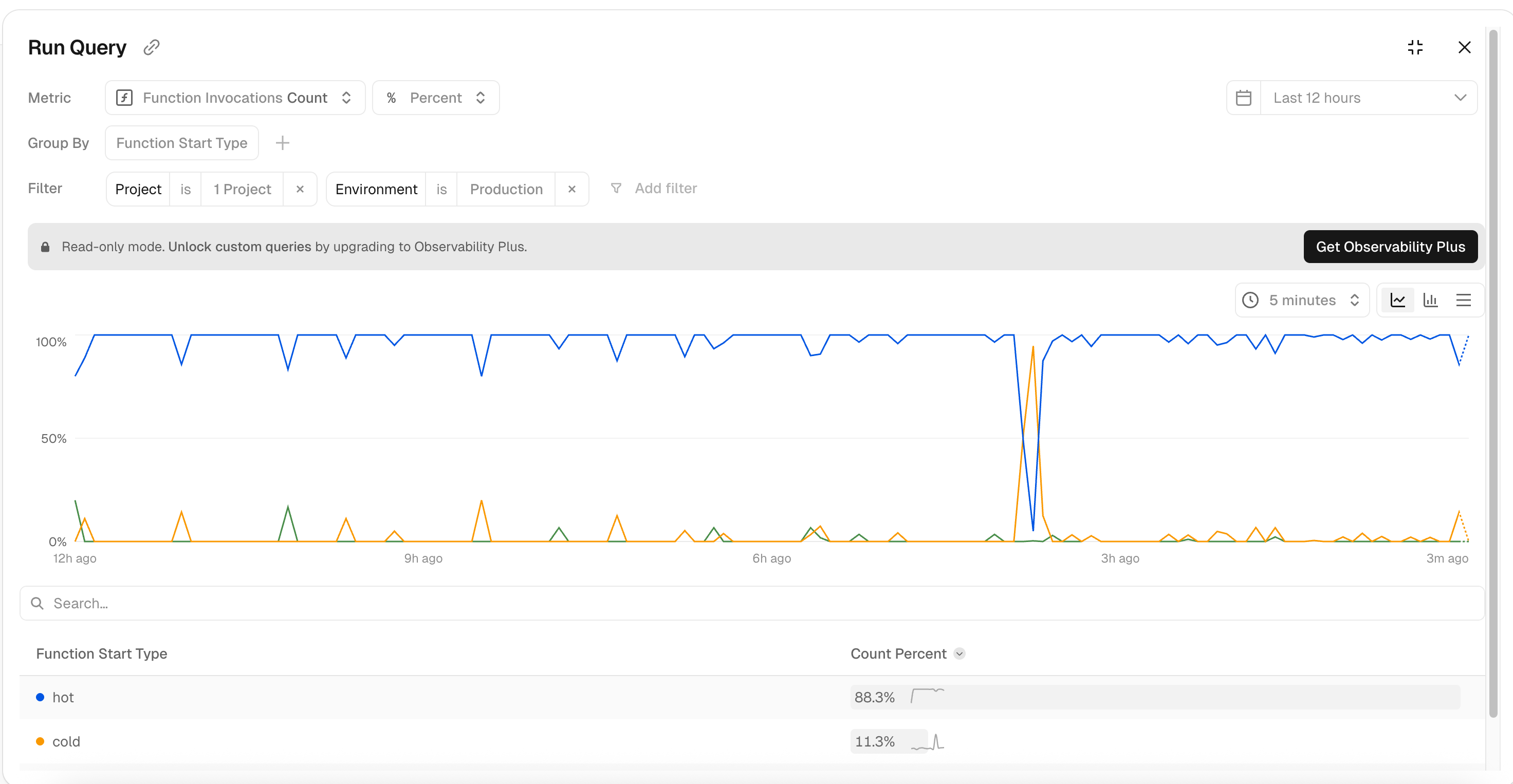
At the time of wrigint, Cloudflare and Netlify do not provide an equivalent cold-start visibility. To measure cold starts on these platforms, the mechanism used in this benchmark can be implemented (see this and this file).
Tracking runtime initialization on the server and exposing it to the browser allows tracking it. For example:
<meta name="x-is-cold-start" content="true" />
This meta-data can then be collected on the client and sent to monitoring or analytics tool of choice.
Example: GA4
const isColdStarted = document.querySelector('meta[name="x-is-cold-start"]');
gtag('event', 'server_start', {
  start_type: isColdStarted?.content === 'true' ? 'cold' : 'warm'
});
Example : NewRelic
const isColdStarted = document.querySelector('meta[name="x-is-cold-start"]');
newrelic.setCustomAttribute('coldstarted', isColdStarted?.content === 'true');`
This allows correlating cold-start data to real-user performance metrics and quantifying its contribution to the overall page and API latency.
5. Conclusion
Cold-start delay is an important factor when evaluating serverless Nextjs hosting platforms. Its impact on real-world loading speed is difficult to reason about in production and permanently eliminating it typically requires changing the hosting provider.
Following are the important cold-start specific takeaways to consider for hosting Nextjs site on a serverless platform:
- Fastest over-all.
- Has minimal cold start impact owing to its V8 isolate runtime.
- Atleast 3x slower than the other platforms (even during warm runtime).
- While cold-starts were less frequent than Vercel, responses were 3x slower than those served by warm runtimes.
- Fast response speed for pages.
- API response speed notably slower than the same for pages.
- Most frequent cold starts for APIs among the platforms.
- No CDN = slower than warm Vercel and Netlify.
- No cold starts = least fluctuation in response speed.
Overall, Cloudflare delivers the fastest and most consistent performance, Netlify shows the slowest speed in both cold and warm states, and Vercel performs well for pages but exhibits slower API responses.




Or email: punit@tezify.com

Or email : punit@tezify.com
